SecurePix: Private Photo Vault1.7.1
Publisher Description

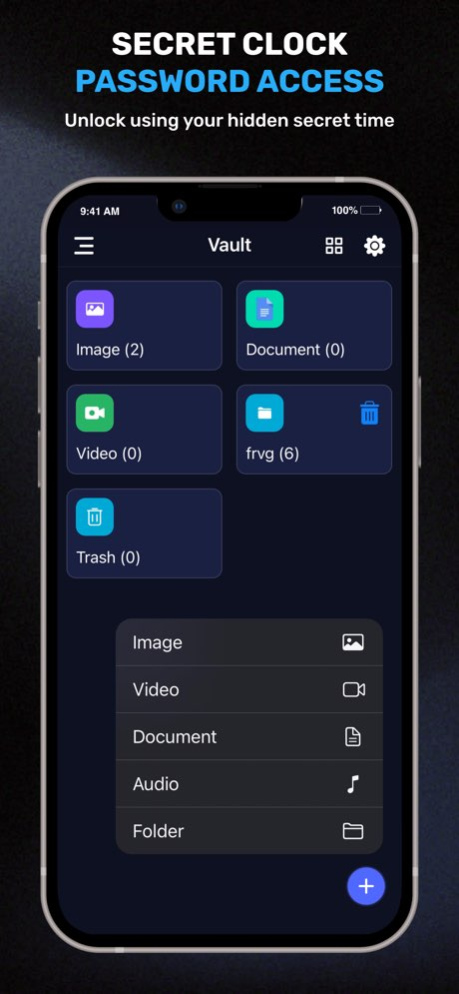


SecurePix: Private Photo Vault helps you hide private photos, videos and personal files inside a discreet clock-style vault. Keep sensitive media away from your regular gallery, organize private folders and unlock your private space with a time-based clock password.
SecurePix is built for everyday privacy on iPhone and iPad. The app looks like a simple clock screen, while your private photo vault stays protected behind your saved clock time.
KEY FEATURES
Private Photo Vault
Import personal photos into a locked vault and keep them separate from your visible gallery. Create private albums for memories, screenshots, documents, IDs and other personal images.
Video Vault
Hide private videos inside SecurePix and view them with the built-in private video player. Keep recordings, family clips, work media and other videos away from casual browsing.
Clock Vault Access
Set your vault password by moving the hour and minute hands to a chosen time. To unlock the vault, enter the same time again on the clock screen.
Private Files & Folders
Organize photos, videos, documents and personal files into private folders. Keep important media easy to find while keeping it away from the Photos app.
Decoy Vault
Use a separate decoy vault when you want another privacy layer. Keep your main private vault separate while showing a different vault if needed.
Private Cloud Backup
Hidden files are stored locally by default. Files are stored online only when you enable Private Cloud Backup and manually upload them. Backup can help during device changes, resets or accidental loss.
Face ID / Touch ID Quick Unlock
Use biometric quick unlock for faster access after setting up your vault password, when supported.
Intruder Selfie
Capture an intruder photo when someone enters the wrong password, so you can review suspicious unlock attempts.
Shake to Lock
Quickly return to the clock screen by shaking your phone when privacy matters.
Private Browser
Browse privately inside the app and keep selected browsing activity separate.
HOW TO SET UP YOUR CLOCK PASSWORD
1. Launch SecurePix Clock Vault. The clock hands will move to 00:00 for setup.
2. Move the hour or minute hand to your desired time password.
3. Press the center button of the clock.
4. Repeat the same time password and press the center button again to confirm.
5. Your private vault will open after confirmation.
HOW TO UNLOCK THE VAULT
1. Open SecurePix and press the center button of the clock.
2. The clock hands will move to 00:00.
3. Move the hour and minute hands to your saved password time.
4. Press the center button again to validate.
5. Once unlocked, you can hide photos, videos and personal files.
PASSWORD RECOVERY
If you forget your vault password, launch SecurePix and press the center button of the clock. Move the clock hands to 10:10 and press the center button again. The app will show password recovery options.
IMPORTANT DATA SAFETY REMINDER
Do not uninstall SecurePix before restoring files to the public gallery or backing them up through Private Cloud Backup. Hidden files are stored locally by default. Any files not restored or uploaded online may be permanently lost if you uninstall the app, reset your phone or change devices.
Before transferring to a new device, performing a factory reset or uninstalling the app, unlock the vault and restore or back up all hidden files.
WHY USE SECUREPIX?
SecurePix can help you:
* Hide private photos from your gallery
* Hide videos in a discreet clock vault
* Store personal files in private folders
* Open your vault with a clock password
* Use decoy vault mode for added privacy
* Back up selected vault files online
* Unlock faster with Face ID or Touch ID
* Capture wrong password attempts with Intruder Selfie
* Return to the clock screen with Shake to Lock
* Browse privately inside the app
Use SecurePix: Private Photo Vault to keep private photos, videos and personal files organized in a discreet clock vault built for everyday privacy on iOS.
Version History This update improves SecurePix Clock Vault with a smoother private vault experience, better folder handling, privacy tools, and reliability improvements.
Highlights:
* Decoy Vault for an added privacy layer
* Private Cloud Backup for selected vault files
* Intruder Selfie for wrong password attempts
* Shake to Lock for quick privacy access
* Face ID / Touch ID quick unlock
* Private Browser improvements
* Better folder and file organization
* Light, dark and system appearance support
* Performance improvements and bug fixes 1.7.1 Sep 4 This update improves SecurePix Clock Vault with a smoother private vault experience, better folder handling, privacy tools, and reliability improvements.
Highlights:
* Decoy Vault for an added privacy layer
* Private Cloud Backup for selected vault files
* Intruder Selfie for wrong password attempts
* Shake to Lock for quick privacy access
* Face ID / Touch ID quick unlock
* Private Browser improvements
* Better folder and file organization
* Light, dark and system appearance support
* Performance improvements and bug fixes 1.7 Aug 14 This update improves SecurePix Clock Vault with a smoother private vault experience, better folder handling, privacy tools, and reliability improvements.
Highlights:
* Decoy Vault for an added privacy layer
* Private Cloud Backup for selected vault files
* Intruder Selfie for wrong password attempts
* Shake to Lock for quick privacy access
* Face ID / Touch ID quick unlock
* Private Browser improvements
* Better folder and file organization
* Light, dark and system appearance support
* Performance improvements and bug fixes 1.6 Jul 6 What's New
Premium features
• Shake to Lock — shake your phone to return to the clock screen instantly
• Intruder Selfie — capture a photo when someone enters the wrong password
• Decoy Vault — a separate vault with its own password for added privacy
• Private Cloud Backup — back up and restore your vault securely
• Face ID / Touch ID — unlock faster with biometric quick unlock
• Private Browser — browse privately inside the app
Plus
• Smoother launch with an updated splash screen
• Improved vault and folder UI on iPhone and iPad
• Appearance setting — light, dark, or system theme
• Performance improvements and bug fixes 1.5 May 20 Thanks for staying with us!
This update includes minor bug fixes and usability improvements to make the app smoother and more reliable.
Enjoying the app? Please leave a review—it really helps us improve! 1.4 Jan 6 update custom folder add/delete. 1.3 10/14/2025 - Improve Performance
- Fixes Minor Bugs 1.2 02/23/2024 - Update App Performance
- Resolve Minor Bugs 1.1 01/05/2024 1.0 12/18/2023
About SecurePix: Private Photo Vault
The company that develops SecurePix: Private Photo Vault is Rana Parulben. The latest version released by its developer is 1.7.1.
To install SecurePix: Private Photo Vault on your iOS device, just click the green Continue To App button above to start the installation process. The app is listed on our website since 2026-10-14 and was downloaded 1 times. We have already checked if the download link is safe, however for your own protection we recommend that you scan the downloaded app with your antivirus. Your antivirus may detect the SecurePix: Private Photo Vault as malware if the download link is broken.
How to install SecurePix: Private Photo Vault on your iOS device:
- Click on the Continue To App button on our website. This will redirect you to the App Store.
- Once the SecurePix: Private Photo Vault is shown in the iTunes listing of your iOS device, you can start its download and installation. Tap on the GET button to the right of the app to start downloading it.
- If you are not logged-in the iOS appstore app, you'll be prompted for your your Apple ID and/or password.
- After SecurePix: Private Photo Vault is downloaded, you'll see an INSTALL button to the right. Tap on it to start the actual installation of the iOS app.
- Once installation is finished you can tap on the OPEN button to start it. Its icon will also be added to your device home screen.
Program Details
System requirements
Download information
Pricing
Version History
version 1.7.1
posted on 2026-10-14
Version History This update improves SecurePix Clock Vault with a smoother private vault experience, better folder handling, privacy tools, and reliability improvements.
Highlights:
* Decoy Vault for an added privacy layer
* Private Cloud Backup for selected vault files
* Intruder Selfie for wrong password attempts
* Shake to Lock for quick privacy access
* Face ID / Touch ID quick unlock
* Private Browser improvements
* Better folder and file organization
* Light, dark and system appearance support
* Performance improvements and bug fixes 1.7.1 Sep 4 This update improves SecurePix Clock Vault with a smoother private vault experience, better folder handling, privacy tools, and reliability improvements.
Highlights:
* Decoy Vault for an added privacy layer
* Private Cloud Backup for selected vault files
* Intruder Selfie for wrong password attempts
* Shake to Lock for quick privacy access
* Face ID / Touch ID quick unlock
* Private Browser improvements
* Better folder and file organization
* Light, dark and system appearance support
* Performance improvements and bug fixes 1.7 Aug 14 This update improves SecurePix Clock Vault with a smoother private vault experience, better folder handling, privacy tools, and reliability improvements.
Highlights:
* Decoy Vault for an added privacy layer
* Private Cloud Backup for selected vault files
* Intruder Selfie for wrong password attempts
* Shake to Lock for quick privacy access
* Face ID / Touch ID quick unlock
* Private Browser improvements
* Better folder and file organization
* Light, dark and system appearance support
* Performance improvements and bug fixes 1.6 Jul 6 What's New
Premium features
• Shake to Lock — shake your phone to return to the clock screen instantly
• Intruder Selfie — capture a photo when someone enters the wrong password
• Decoy Vault — a separate vault with its own password for added privacy
• Private Cloud Backup — back up and restore your vault securely
• Face ID / Touch ID — unlock faster with biometric quick unlock
• Private Browser — browse privately inside the app
Plus
• Smoother launch with an updated splash screen
• Improved vault and folder UI on iPhone and iPad
• Appearance setting — light, dark, or system theme
• Performance improvements and bug fixes 1.5 May 20 Thanks for staying with us!
This update includes minor bug fixes and usability improvements to make the app smoother and more reliable.
Enjoying the app? Please leave a review—it really helps us improve! 1.4 Jan 6 update custom folder add/delete. 1.3 10/14/2025 - Improve Performance
- Fixes Minor Bugs 1.2 02/23/2024 - Update App Performance
- Resolve Minor Bugs 1.1 01/05/2024 1.0 12/18/2023
version 1.7.1
posted on 2026-09-05
Version History This update improves SecurePix Clock Vault with a smoother private vault experience, better folder handling, privacy tools, and reliability improvements.
Highlights:
* Decoy Vault for an added privacy layer
* Private Cloud Backup for selected vault files
* Intruder Selfie for wrong password attempts
* Shake to Lock for quick privacy access
* Face ID / Touch ID quick unlock
* Private Browser improvements
* Better folder and file organization
* Light, dark and system appearance support
* Performance improvements and bug fixes 1.7.1 17h ago This update improves SecurePix Clock Vault with a smoother private vault experience, better folder handling, privacy tools, and reliability improvements.
Highlights:
* Decoy Vault for an added privacy layer
* Private Cloud Backup for selected vault files
* Intruder Selfie for wrong password attempts
* Shake to Lock for quick privacy access
* Face ID / Touch ID quick unlock
* Private Browser improvements
* Better folder and file organization
* Light, dark and system appearance support
* Performance improvements and bug fixes 1.7 Aug 14 This update improves SecurePix Clock Vault with a smoother private vault experience, better folder handling, privacy tools, and reliability improvements.
Highlights:
* Decoy Vault for an added privacy layer
* Private Cloud Backup for selected vault files
* Intruder Selfie for wrong password attempts
* Shake to Lock for quick privacy access
* Face ID / Touch ID quick unlock
* Private Browser improvements
* Better folder and file organization
* Light, dark and system appearance support
* Performance improvements and bug fixes 1.6 Jul 6 What's New
Premium features
• Shake to Lock — shake your phone to return to the clock screen instantly
• Intruder Selfie — capture a photo when someone enters the wrong password
• Decoy Vault — a separate vault with its own password for added privacy
• Private Cloud Backup — back up and restore your vault securely
• Face ID / Touch ID — unlock faster with biometric quick unlock
• Private Browser — browse privately inside the app
Plus
• Smoother launch with an updated splash screen
• Improved vault and folder UI on iPhone and iPad
• Appearance setting — light, dark, or system theme
• Performance improvements and bug fixes 1.5 May 20 Thanks for staying with us!
This update includes minor bug fixes and usability improvements to make the app smoother and more reliable.
Enjoying the app? Please leave a review—it really helps us improve! 1.4 Jan 6 update custom folder add/delete. 1.3 10/14/2025 - Improve Performance
- Fixes Minor Bugs 1.2 02/23/2024 - Update App Performance
- Resolve Minor Bugs 1.1 01/05/2024 1.0 12/18/2023
version 1.6
posted on 2026-08-12
Version History This update improves SecurePix Clock Vault with a smoother private vault experience, better folder handling, privacy tools, and reliability improvements.
Highlights:
* Decoy Vault for an added privacy layer
* Private Cloud Backup for selected vault files
* Intruder Selfie for wrong password attempts
* Shake to Lock for quick privacy access
* Face ID / Touch ID quick unlock
* Private Browser improvements
* Better folder and file organization
* Light, dark and system appearance support
* Performance improvements and bug fixes 1.6 Jul 6 What's New
Premium features
• Shake to Lock — shake your phone to return to the clock screen instantly
• Intruder Selfie — capture a photo when someone enters the wrong password
• Decoy Vault — a separate vault with its own password for added privacy
• Private Cloud Backup — back up and restore your vault securely
• Face ID / Touch ID — unlock faster with biometric quick unlock
• Private Browser — browse privately inside the app
Plus
• Smoother launch with an updated splash screen
• Improved vault and folder UI on iPhone and iPad
• Appearance setting — light, dark, or system theme
• Performance improvements and bug fixes 1.5 May 20 Thanks for staying with us!
This update includes minor bug fixes and usability improvements to make the app smoother and more reliable.
Enjoying the app? Please leave a review—it really helps us improve! 1.4 Jan 6 update custom folder add/delete. 1.3 10/14/2025 - Improve Performance
- Fixes Minor Bugs 1.2 02/23/2024 - Update App Performance
- Resolve Minor Bugs 1.1 01/05/2024 1.0 12/18/2023
version 1.5
posted on 2026-07-01
Version History What's New
Premium features
• Shake to Lock — shake your phone to return to the clock screen instantly
• Intruder Selfie — capture a photo when someone enters the wrong password
• Decoy Vault — a separate vault with its own password for added privacy
• Private Cloud Backup — back up and restore your vault securely
• Face ID / Touch ID — unlock faster with biometric quick unlock
• Private Browser — browse privately inside the app
Plus
• Smoother launch with an updated splash screen
• Improved vault and folder UI on iPhone and iPad
• Appearance setting — light, dark, or system theme
• Performance improvements and bug fixes 1.5 May 20 Thanks for staying with us!
This update includes minor bug fixes and usability improvements to make the app smoother and more reliable.
Enjoying the app? Please leave a review—it really helps us improve! 1.4 Jan 6 update custom folder add/delete. 1.3 10/14/2025 - Improve Performance
- Fixes Minor Bugs 1.2 02/23/2024 - Update App Performance
- Resolve Minor Bugs 1.1 01/05/2024 1.0 12/18/2023
version 1.4
posted on 2026-05-17
Version History Thanks for staying with us!
This update includes minor bug fixes and usability improvements to make the app smoother and more reliable.
Enjoying the app? Please leave a review—it really helps us improve! 1.4 Jan 6 update custom folder add/delete. 1.3 10/14/2025 - Improve Performance
- Fixes Minor Bugs 1.2 02/23/2024 - Update App Performance
- Resolve Minor Bugs 1.1 01/05/2024 1.0 12/18/2023
version 1.4
posted on 2026-01-06
Thanks for staying with us!
This update includes minor bug fixes and usability improvements to make the app smoother and more reliable.
Enjoying the app? Please leave a review—it really helps us improve!
